To photograph your prescription label, take a clear photo of the pharmacy sticker on your box. Your name, medicine, strength, dispensing date and pharmacy details must all be readable. Keep the whole label in frame and follow the new pharmacy’s instructions. A branded box or bare pen on its own may not show who the medicine was for.
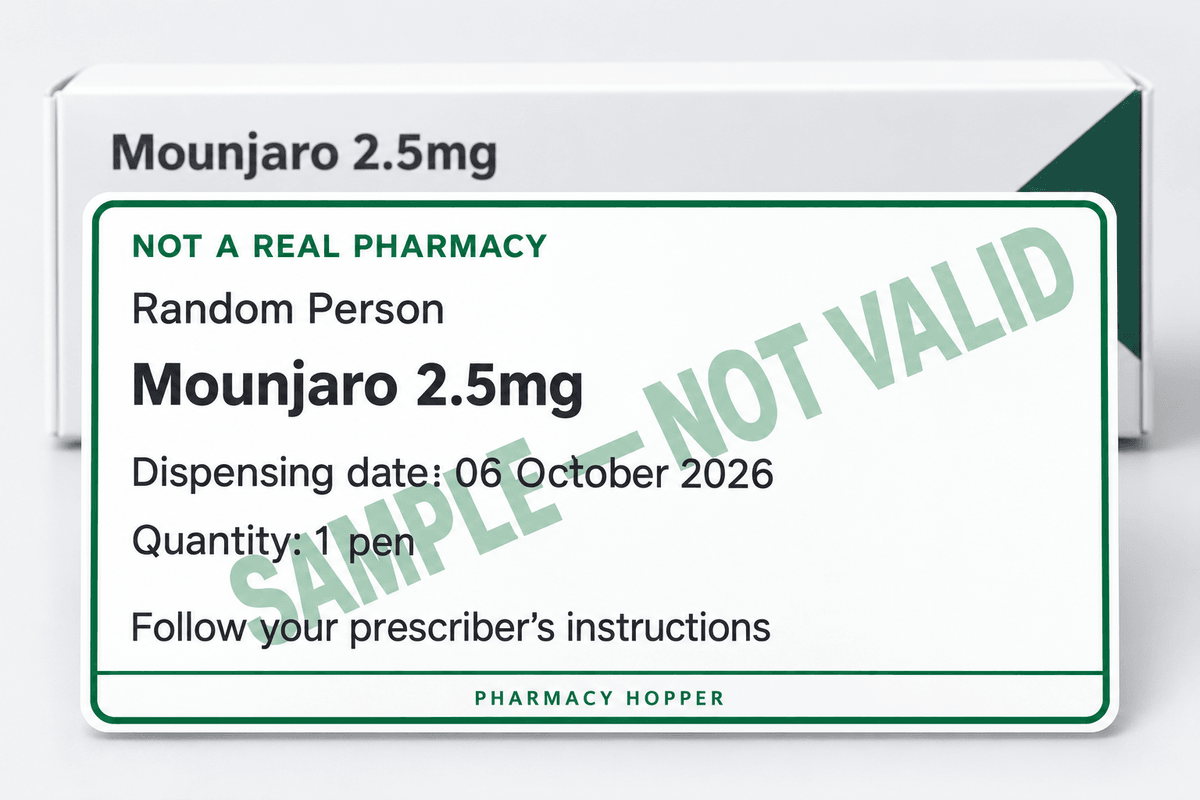
Find the pharmacy dispensing sticker on your pen or box
The dispensing label is the pharmacy sticker on your box. The sticker shows your name and the order details. Look on the outer carton as well as the pen. For tablets, check the box or labelled container they came in. Pharmacies put the label in different places.
The maker’s packaging shows what the product is. The dispensing sticker links the medicine to you and to the pharmacy which supplied the medicine. If the sticker is missing or unreadable, ask for official replacement evidence. Never make a new label yourself.
Five details your prescription label photo should show
| Detail | What the photo needs to show |
|---|---|
| Patient name | The name on the pharmacy record, readable without guessing. |
| Medicine and form | The product name, and whether the item is a pen, tablet or another form. |
| Strength | The strength exactly as printed. Do not guess a dose from colour or pack size. |
| Dispensing date | The date on the pharmacy label. The product expiry date is a different date. |
| Pharmacy details | The name of the pharmacy and any reference printed on the label. |
Use the five details as a checklist. Each pharmacy sets its own rules on what it accepts. Slinic’s published switching page, for example, asks for label evidence with your name and a date, and says how recent the evidence must be. Your new pharmacy may ask for something different.
How to take a clear label photo on your phone
- Use bright, even light. Put the pack on a plain surface near a window. Tilt the pack to stop glare on glossy labels.
- Clean the lens and hold still. Tap the label on screen to focus, if your camera lets you.
- Keep every edge in view. Move closer only while all the text you need stays in frame.
- Take a wider shot too if the medicine name and label sit on different sides, or if the pharmacy asks to see the whole pack.
- Zoom in to check. Open the saved photo and make sure a reader can make out the name, strength and date without guessing.
If the photo is blurred, take a new one from the original pack. Do not use AI enhancement, generative fill, retouching, filters or text replacement on prescription evidence. These tools can change what the label says. Ask the pharmacy before you crop or cover any detail the team needs to check.
Pen, pen box or pill box: which should you photograph?
Photograph the original item with the dispensing label on. If the pen has no sticker but the carton does, photograph the carton. If your tablets came in a labelled box, photograph the box. If a blister strip has been split from the labelled pack, ask the pharmacy what other proof it needs.
A photo of your medicine is no dose check. The photo cannot show whether you took every dose or had side effects. Explain your treatment history separately. A strength printed on a pack does not set your next prescription.
Where to send your prescription label photo
Send the photo only through the upload, message or email method the pharmacy’s team gives you. Labels hold personal health details. Start from the pharmacy’s official website or a patient account you know. If an unexpected message asks for documents, check the request through a contact you already trust.
Do not post a label photo in a public forum, a social media comment or a pharmacy review. Do not upload the photo to Pharmacy Hopper either. This site does not collect prescription photos. Keep a private copy of the original until any questions about your evidence are settled.
If you switch pharmacy every month to pay the new-customer price, each new pharmacy will ask for a label photo like this one.
What to do if your label is missing or rejected
Ask whether a dispensing summary, prescription record or treatment letter is acceptable instead. An order confirmation may help. On its own, an order confirmation may not prove the medicine was supplied or show what you used. Tell the new team which records you hold and let the team decide.
If your photo is rejected, ask for the exact reason. The reason may be a missing name, a cropped date, an unreadable strength, old evidence or something else. Fix the problem using your real records. If two documents disagree, explain the difference. Never edit either document.
Frequently asked questions
What should a prescription label photo show?
A prescription label photo should show your name, the medicine and its form, the strength as printed, the dispensing date and the pharmacy’s details. Keep every edge of the label in frame so each detail is readable without guessing.
Can I send a photo of the medicine box without the pharmacy sticker?
A branded box or bare pen on its own may not show who the medicine was for. Photograph the pharmacy dispensing sticker instead. If the sticker is missing, ask the pharmacy whether a dispensing summary, prescription record or treatment letter is acceptable.
Can I edit or enhance a blurry prescription label photo?
No. Do not use AI enhancement, generative fill, retouching, filters or text replacement on prescription evidence. These tools can change what the label says. Take a new photo from the original pack, and ask the pharmacy before you crop or cover any detail.
Where do I send my prescription label photo when I switch pharmacy?
Send the label photo only through the new pharmacy’s official website, your patient account or the upload, message or email method its team gives you. Never post a label photo in public. Pharmacy Hopper does not collect prescription photos.
Sources
Links checked on 6 October 2026. Provider prices and policies change, so confirm the details with the provider before you pay. The organisations linked here have not reviewed or endorsed this guide.
- Slinic: switching from another provider: evidence policy
- MedExpress: information needed when switching GLP-1 medicines
Pharmacy Hopper does not give medical advice. Read our editorial standards.